deviant art


Login
Join deviantART for FREE Take the Tour Lost Password?
Deviant Login
Shop
 Join deviantART for FREE Take the Tour
[x]

More from ~krishna-sq

Featured in Groups:

Details

March 25, 2009
190 KB
1024×576
Link
Thumb

Statistics

Comments: 18
Favourites: 4 [who?]
Views: 611 (1 today)
Downloads: 24 (0 today)
[x]
:iconkrishna-sq:
:icon:
Add a Comment:
 
love 0 0 joy 3 3 wow 1 1 mad 0 0 sad 1 1 fear 0 0 neutral 0 0
:iconalavi-theartist:
~Alavi-TheArtist Jul 13, 2009  Professional Digital Artist
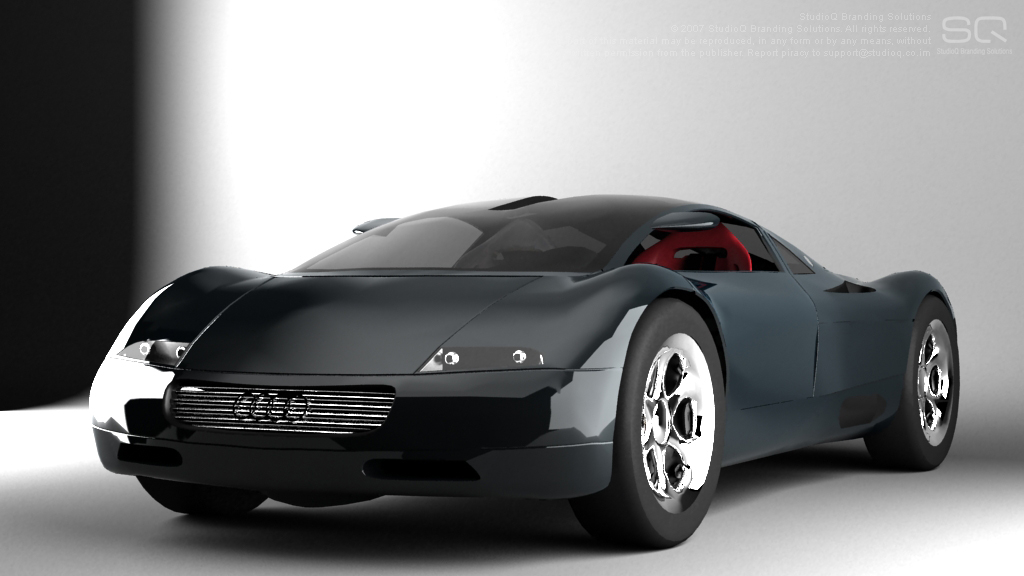
Your 3D models are great but you have a lot of rendering problem . There are some great Vray renderers around DA . Try to follow their techniques :) Best of luck

--
Alavi
Reply
:iconbrentogara:
Mood: Pity =BrentOGara May 19, 2012  Hobbyist Digital Artist
A lot of the trouble could be averted with HDR outputs... the highlights are clipping out of the RGB 8 bit per pixel colorspace, and so are the shadows. If this image were output as a 32 bit per pixel .hdr or .tiff you could use Photoshop (or HDRshop) to adjust the 'exposure' to preserve all the details without the clipping.

The artists could also learn proper VRay linear workflow for lighting... but tweaking the exposure and gamma sliders in Photoshop is much easier and faster.

It's a pretty cool car though... too bad about the lighting... and the apparent lack of anti-aliasing.

--
You can't read my t-shirt 'cause my beard covers it.
Reply
:iconalavi-theartist:
~Alavi-TheArtist May 19, 2012  Professional Digital Artist
Rendering directly in Linear workflow and adjusting in post to make it look like linear colorspace render are not the same... so the only way is to directly render in linear colorspace.

--
Alavi
Reply
:iconbrentogara:
Mood: Optimism =BrentOGara May 19, 2012  Hobbyist Digital Artist
They're not the same thing at all... but they can produce similar results. Which is why I suggested doing one or the other. You could also do both, but that wouldn't be very effective unless you were simply using the 32bit information to tweak a linear workflow image which rendered too light or dark... or unless you wanted to imitate a "HDR" style image.

It's just a shame to see such a nice car and lighting setup crippled by clipped values out of range for the image format.

--
You can't read my t-shirt 'cause my beard covers it.
Reply
:iconalavi-theartist:
~Alavi-TheArtist May 19, 2012  Professional Digital Artist
Hmmm.

--
Alavi
Reply
:iconbrentogara:
=BrentOGara May 20, 2012  Hobbyist Digital Artist
Hmmm??? :D

Also, just out of curiosity... why do you let the clipping happen? I can't imagine you're doing it on purpose, and you seem to have the technical know-how to stop it. Are these just old renders?

--
You can't read my t-shirt 'cause my beard covers it.
Reply
:iconalavi-theartist:
~Alavi-TheArtist 6 days ago  Professional Digital Artist
Haha yeah they are old renders :D sometimes on recent works I keep bright highlights for purpose but in a manageable look. Example this scene [link] it's normal when we take photos of interior with a camera the outdoor becomes very bright as the camera tries to adjust it's exposure for the interior. As like in one of my old render [link] I didn't maintain that law.

--
Alavi
Reply
:iconbrentogara:
Mood: Wow! =BrentOGara 6 days ago  Hobbyist Digital Artist
The glowing windows in Living Room 3 do look a lot more realistic than the crisp clear mountainside in Hip-Hop Interior 2... but some people like the "Fake HDR" look. Personally, I think the lighting in Living Room 3 is beautifully well balanced, I'd be very happy to get that kind of result myself.

--
You can't read my t-shirt 'cause my beard covers it.
Reply
(1 Reply)
:icon:
Add a Comment: